One antivirus detection can be a local issue.
The same detection across multiple vessel PCs is different.
It may point to shared installers, repeated USB use, copied tools, network shares, browser downloads, or a process that keeps reintroducing the same risk.
That is why Cyber Detective now includes correlation reporting for Defender virus detections.
Instead of showing only individual alerts, the report groups detections so teams can look for patterns across vessels and computers.
It also cross-correlates the available Defender fields so the same event can be reviewed from several angles: threat name, vessel, PC, source category, file path, process name, first seen time, and last seen time.
What the correlation report includes
The correlation report groups Defender virus alert data into several operational views:
- total detection count
- affected PC count
- affected vessel count
- unique threat count
- top source category
- latest detection time
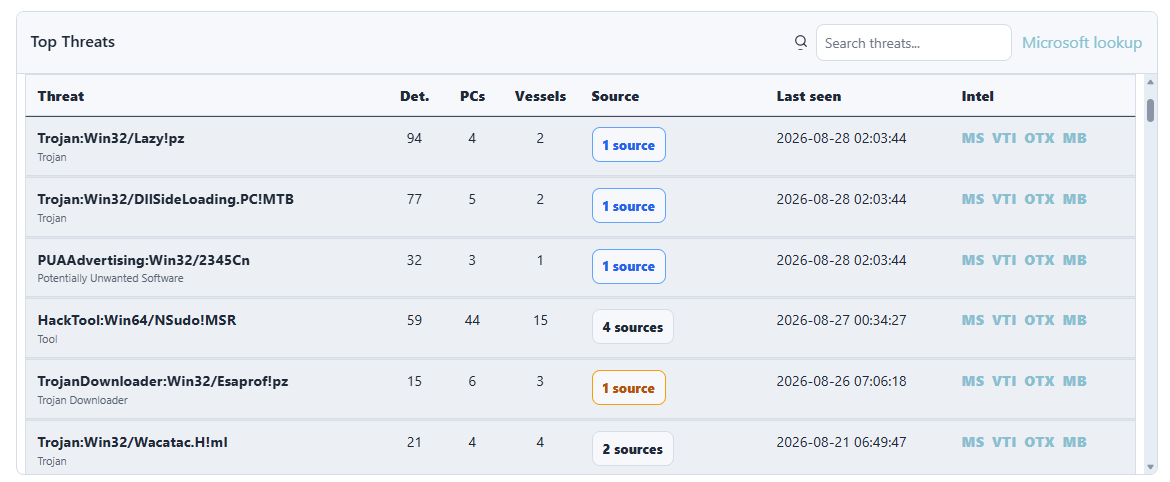
- top threats by Defender name
- affected PCs grouped by vessel and computer
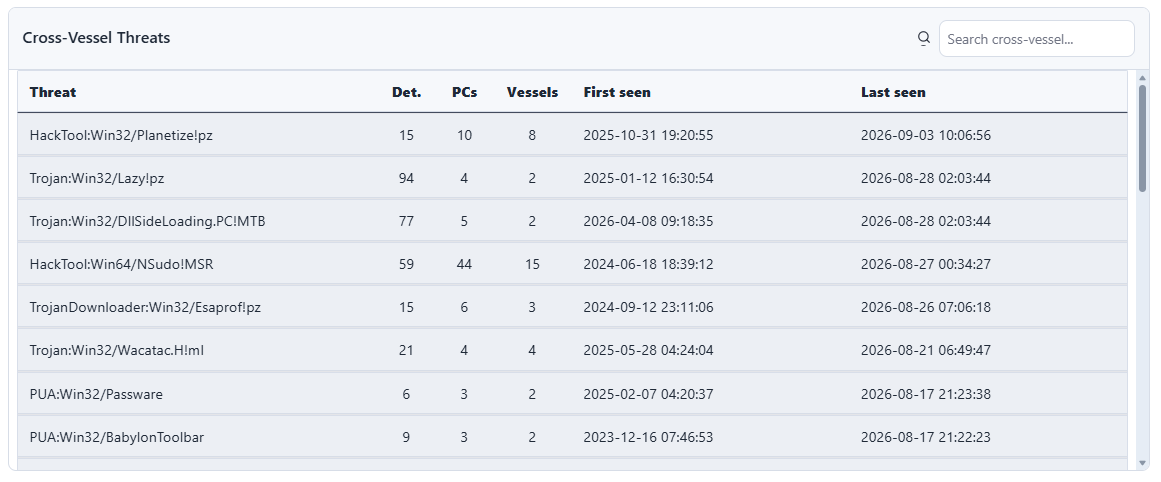
- cross-vessel threats
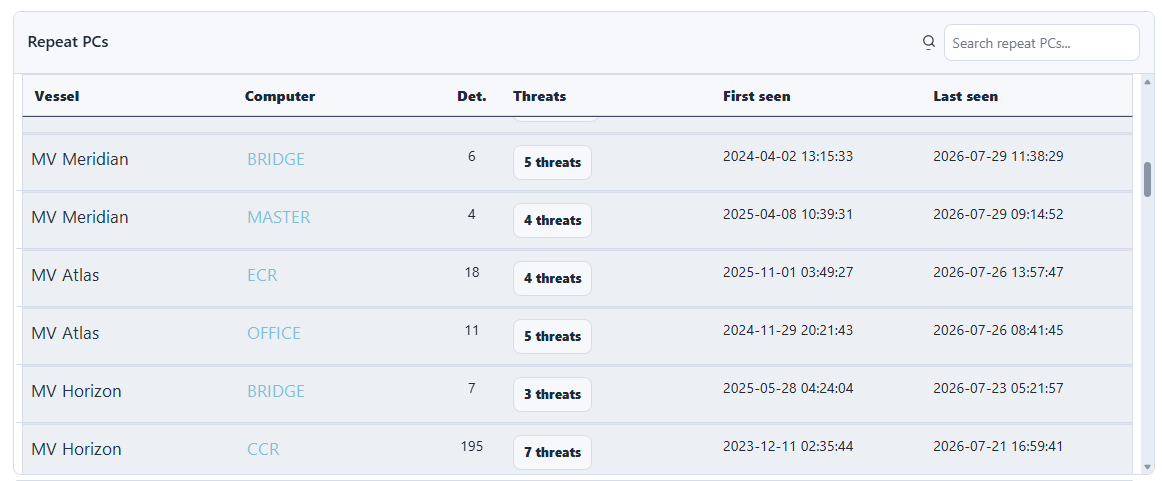
- repeat PCs
- top file paths
- top processes
- source profile by likely origin
- first-seen and last-seen timing for recurring items
Each table includes search so the operator can quickly filter by threat, vessel, PC, source, path, or process. Long lists are opened through buttons instead of being squeezed into narrow table columns, which makes the report easier to scan on large fleets.
What cross-correlation adds
Cross-correlation is the part that turns a list of detections into a useful investigation starting point.
Cyber Detective links related fields together so the operator can ask questions such as:
- which vessels saw the same Defender threat name?
- which PCs repeatedly saw different threat names from the same source type?
- which source categories are associated with the most affected vessels?
- which file paths appear across multiple computers?
- which process names are involved in repeated detections?
- did the same pattern happen recently, or is it historical noise?
This is especially useful when detections are not identical but still look related. A fleet may show different Defender names, but the same file path, the same removable drive pattern, the same browser download pattern, or the same affected onboard role.
The report does not claim that correlation proves a single incident. It gives the shore team a better map of where related activity may exist.
Threat research links
Each top threat row includes quick links for external research.
The Microsoft link uses the original Microsoft Defender threat name, because Microsoft understands its own naming scheme best.
The other links use a cleaned search term where possible. For example, a Defender name with platform prefixes such as Trojan:Win32/... is simplified before sending it to other databases.
The report links to:
- Microsoft Security Intelligence
- VirusTotal Intelligence-style search
- AlienVault OTX pulse search
- MalwareBazaar signature search
These links are a starting point, not a verdict. Hashes, URLs, domains, and IP addresses are usually stronger indicators for external databases. But even with only Defender names, the links can help an analyst quickly check whether a family or tool name appears elsewhere.
Cross-vessel patterns
Some detections matter because they appear in more than one place.
The Cross-Vessel Threats report highlights Defender threat names that have appeared across multiple vessels. This gives the support team a better starting point for investigation.
Useful follow-up questions include:
- did the same file name appear on several vessels?
- was the source a local disk, browser download, network share, or non-system drive?
- are the same PCs repeatedly affected?
- did detections happen around the same time?
- does the event look like a blocked unwanted program, a repeated tool, or a wider hygiene issue?
Repeated PCs
Repeated detections on the same endpoint are also worth reviewing.
That does not always mean there is an active infection. It may be a folder that keeps receiving the same file, a crew workflow, an installer cache, a shared drive, or an endpoint that needs cleanup.
The important thing is visibility.
When repeated activity is visible, the shore team can decide whether to request cleanup, run a script, check the source path, review USB activity, or inspect the vessel workflow behind the repeated detections.
Drilldown without clutter
Some report fields naturally contain too much information for one table cell.
For example, a source category may involve many vessels and many computers. A repeated PC may have several threat names. A top source may include several file names.
Cyber Detective handles this with drilldown buttons. The operator can open a modal showing the full list of vessels and computers, threats, sources, or files. The vessel/PC modal includes its own filter so the user can search inside the drilldown list.
This keeps the main report readable while keeping the detail close at hand.
Better triage
Correlation does not replace investigation.
It improves triage.
For maritime IT teams, that matters. Limited bandwidth and delayed vessel access mean the first question should be practical:
Where should we spend our attention first?
Cyber Detective helps answer that with grouped Defender detection history, affected PCs, affected vessels, source categories, and last-seen timing.