Knowing that Defender detected something is useful.
Knowing where it probably came from is better.
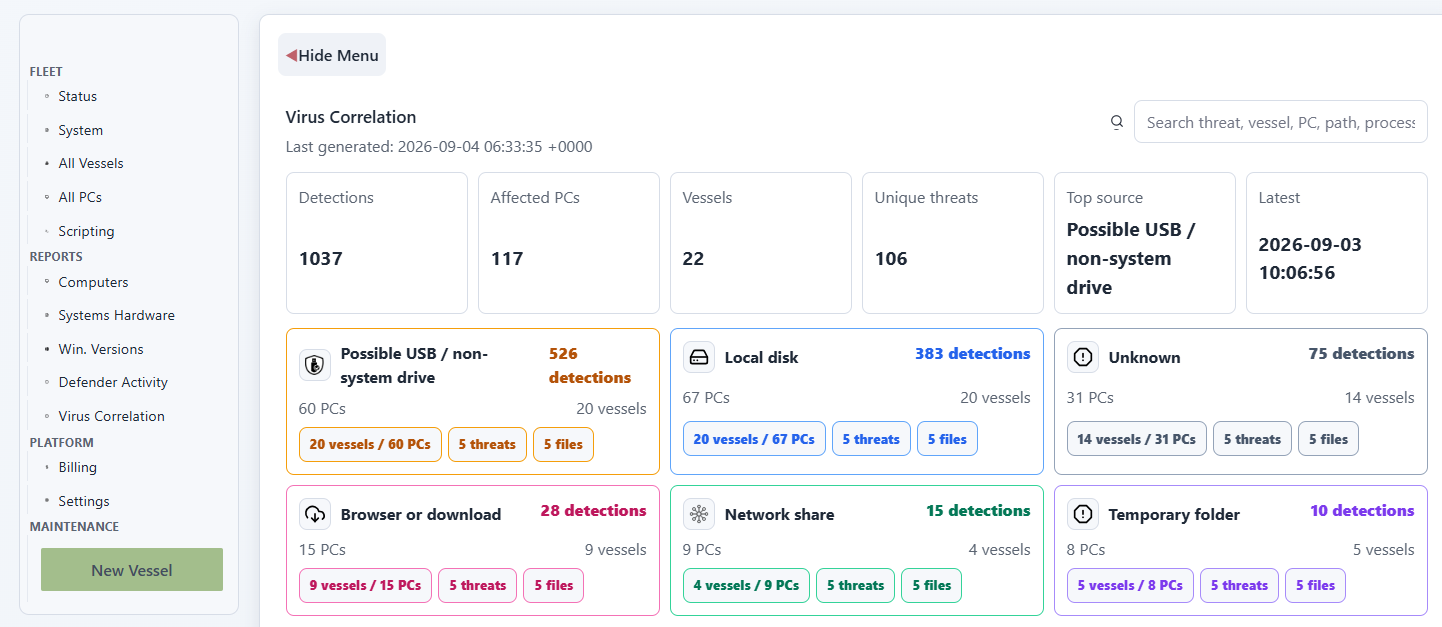
Cyber Detective now groups Defender virus detections by likely source so shore teams can see whether detections appear to be connected to:
- USB or other non-system drives
- local disk
- browser or download activity
- network shares
- temporary folders
- unknown or unclear origins
How source grouping works
Cyber Detective looks at fields returned with the Defender event, especially the detected path and process name.
The report then classifies the likely source into categories such as:
- possible USB or non-system drive
- local disk
- network share
- browser or download
- temporary folder
- unknown
For example, a detection from a non-C: drive may be treated as possible USB or non-system drive activity. A browser process or download/cache path may be grouped as browser or download. A UNC path can be grouped as network share activity.
The classification is intentionally cautious. It gives the operator a likely origin for triage, not a final forensic conclusion.
Once detections are grouped by source, Cyber Detective can cross-correlate them with other fields. That makes it easier to see, for example, whether a USB-like pattern affects many vessels, whether browser/download detections cluster around certain PCs, or whether the same process appears behind repeated local disk detections.
What the source cards show
Each source card includes:
- detection count
- affected PC count
- affected vessel count
- latest detection time
- a vessel/PC drilldown
- top threats for that source
- top files for that source
The same source colours are used in the HUD and in the full report, so the team learns one visual language:
- orange for USB or non-system drive
- blue for local disk
- green for network share
- pink for browser or download
- purple for temporary folder
- grey for unknown
Why source matters
The response is different depending on the source.
A browser/download pattern may suggest user download behaviour or a web filtering gap.
A possible USB or non-system drive pattern may point to removable media workflows.
A network share pattern may deserve a look at shared folders, file screening, or how installers and tools are distributed onboard.
Local disk detections may need endpoint cleanup, quarantine review, or software inventory checks.
The same Defender event can lead to very different actions depending on that context.
Source categories are not severity
The colours in the report are category colours.
They are not severity colours.
For example, browser/download may be shown in pink, network share in green, local disk in blue, and USB/non-system drive in orange. That visual language helps the team scan the report quickly without implying that one colour is always more dangerous than another.
The actual follow-up still depends on the threat name, path, affected PC, affected vessel, repeat count, and latest detection time.
From alert to action
The useful workflow is simple:
- review the source category
- open the affected vessels and PCs
- check the top threats
- inspect repeated PCs
- use external intelligence links where useful
- decide whether the next step is cleanup, user guidance, USB review, web filtering, or deeper investigation
This keeps the report practical.
It does not try to turn every detection into a dramatic incident.
It gives maritime IT teams the context they need to decide what deserves attention next.